Back To Working With Cartos
Interacting with Cartos: Chat, Email, Slack, and Better Context
Learning
03/24/2026
Cartos is designed to work more like a teammate than a static analytics chatbot.
You can ask it questions directly in the web app, and it can also follow up through Slack or email when it needs context from the right person.
The quality of the results depends on two things together:
- how you interact with Cartos
- how much useful context your company has already given it
Table of Contents
- The three main interaction modes
- Using Cartos in the web app
- How Slack and email outreach work
- How the recipients list works
- What makes Cartos output better
- Prompt and reply patterns that work well
- What to do when Cartos seems blocked
The three main interaction modes
Cartos currently works across three practical channels:
- Web app chat for direct questions and follow-up analysis
- Slack for outreach and ongoing team conversations when Slack recipients are configured
- Email for outreach and follow-up when email recipients are configured
These channels are complementary, not separate products.
The same company context and retained knowledge can improve all of them.
Using Cartos in the web app
The web app is the fastest place to start.

It is best for:
- asking broad analytical questions
- testing whether a new data connection is working
- following up on a prior answer
- requesting a chart or breakdown
Examples of strong web-chat questions:
- “Why did signups drop this week?”
- “What changed in conversion rate over the last 30 days?”
- “Compare paid and organic traffic quality last month.”
- “Show me which user segments drove the revenue decline.”
If you want prompt examples specifically, see How to Prompt Anamap AI: Practical Guide.
What web chat is good at
Web chat is especially good when you already know the question you want answered.
It is less about routing and more about direct investigation.
How Slack and email outreach work
Slack and email matter when Cartos needs context from a human.
That might happen when Cartos needs to know:
- who owns a topic
- whether a KPI changed definition
- whether a release changed expected behavior
- whether a metric movement is known, expected, or already explained
Cartos can contact people through Slack or email depending on the recipients your company has configured.
In practice:
- Slack is useful when the team works quickly and wants lightweight back-and-forth
- Email is useful when ownership is formal, external, or slower-moving
For a broader operational overview, see How Cartos Operates: What to Expect as a Team.
How the recipients list works
The recipient configuration lives in the AI Tuning page under the Fulltime Agent Runs section.
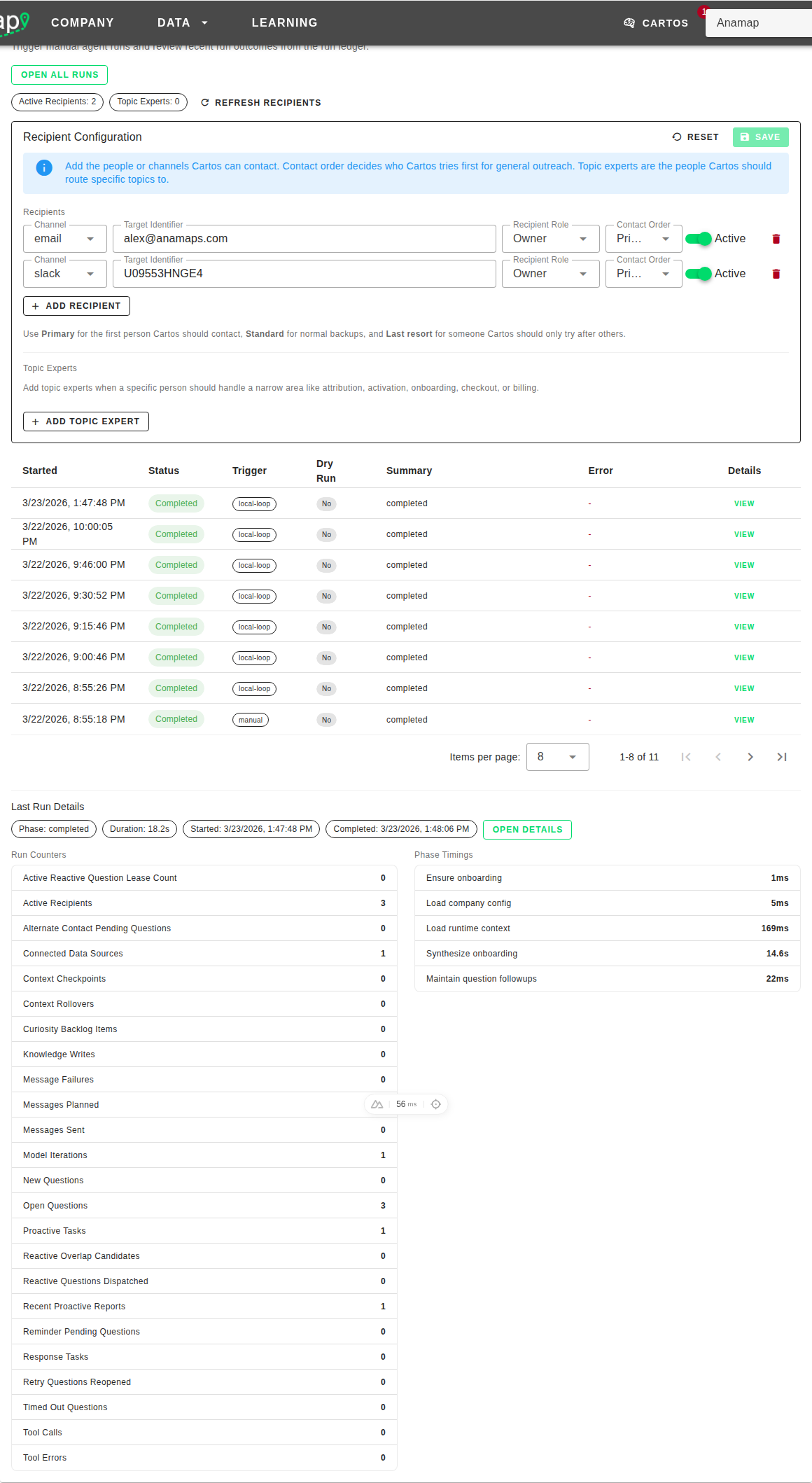
It has two parts:
- Recipients
- Topic Experts
Recipients
Recipients are the people or channels Cartos can contact for general outreach.
Each recipient has:
- a channel:
slackoremail - a target identifier: for example an email address, Slack user ID, or Slack channel
- an optional role tag
- a priority / contact order
- an active or inactive state
The contact order matters because it influences who Cartos tries first for general questions.
The current priority conventions are roughly:
- Primary
- Early Backup
- Standard
- Last Resort
Topic Experts
Topic Experts are for narrow routing.
Use them when a certain person should handle a specific domain such as:
- attribution
- activation
- onboarding
- checkout
- billing
- retention
This helps Cartos avoid sending the same question to a broad fallback group when the right owner is already known.
What makes a good recipient setup
A good setup usually includes:
- at least one active owner or admin recipient
- one or more real operating contacts, not just a technical fallback
- topic experts for the domains that most often create ambiguity
If ownership changes, update the recipients list quickly. Stale routing hurts Cartos quality more than most teams expect.
What makes Cartos output better
Cartos improves when the company gives it better context, not just more prompts.
The highest-leverage things you can do are:
- Connect real analytics sources like GA4 or Amplitude
- Fill in onboarding context when Cartos asks for it
- Keep recipients and topic experts accurate
- Maintain a useful derived company profile in AI Tuning
- Answer follow-up questions directly instead of vaguely when ownership or definitions matter
The best kind of context
The best context is durable context.
Examples:
- “Sarah owns billing experiments.”
- “We care more about activation than raw signups.”
- “This funnel usually dips on weekends.”
- “A release shipped yesterday that changed checkout instrumentation.”
That kind of answer helps not just the current conversation, but future runs too.
Prompt and reply patterns that work well
Good direct prompts
- “Why did demo requests slow down this week?”
- “Compare activation rate for paid vs organic last month.”
- “Show me what changed after the latest checkout release.”
Good replies to Cartos follow-up questions
- “The checkout team owns this. Use Alex first and Jamie as backup.”
- “The metric changed because we redefined qualified signup on Monday.”
- “This drop is expected. We intentionally paused the campaign.”
- “Please use Slack for this topic going forward.”
Less helpful replies
Replies like these often slow Cartos down:
- “Not sure.”
- “Someone else owns it.”
- “It depends.”
Those are not wrong, but they do not give Cartos much durable context to work with.
If you do not know the full answer, even a partial routing answer is helpful.
What to do when Cartos seems blocked
If Cartos is not producing useful work, the issue is usually one of these:
- No analytics source is connected.
- The right recipients are not configured.
- The company context is still too thin.
- The question is too broad for the available data.
The fixes usually look like this:
- Connect GA4 or Amplitude in Company Settings: Configure Cartos, Integrations, and Webhooks
- Improve onboarding and context in AI Tuning: Memory, Learnings, and Approval Workflow
- Add or clean up the recipients list and topic experts
- Give Cartos one concrete follow-up question instead of restarting from scratch
Best practices for teams
- Treat Cartos like a teammate with memory, not a one-off chatbot.
- Answer follow-up questions clearly when they involve ownership, definitions, or expected behavior.
- Keep one or two dependable routing paths configured instead of a long, messy fallback list.
- Use web chat for direct analysis and Slack/email for human context gathering.
- Review Company Settings and AI Tuning together when Cartos quality changes.
If you are configuring the operating surface behind those interactions, start with Company Settings: Configure Cartos, Integrations, and Webhooks.