Back To Working With Cartos
AI Tuning: Memory, Learnings, and Approval Workflow
Learning
03/24/2026
The AI Tuning page is where you inspect what Cartos has learned about your company and decide how much of the schema-learning workflow should happen automatically.
It helps answer two different questions:
- What does Cartos already know?
- How aggressive should Anamap be about accepting AI-suggested schema changes?
Table of Contents
- What AI Tuning controls
- Cartos memory and onboarding context
- Derived company profile
- How schema learnings happen
- Auto-apply controls
- Confidence threshold
- Approving, rejecting, and rolling back learnings
- Who should change these settings
What AI Tuning controls
The page mixes two related but different systems:
- Cartos memory and onboarding context
- The schema learning pipeline and approval queue
That distinction matters.
Cartos memory is durable context Cartos can reuse later during analysis. The schema learning pipeline is the older flow that proposes changes to attributes, events, views, descriptions, validations, and associations.
The auto-apply controls on this page affect the schema learning pipeline. They do not directly govern every piece of Cartos memory.
Cartos memory and onboarding context
At the top of AI Tuning you can inspect the knowledge Cartos has stored for future runs.
Cartos Memory
The Cartos Memory section shows durable knowledge chunks. These are pieces of retained context that Cartos can retrieve later when it needs to understand your business, terminology, or prior findings.
Examples include:
- business definitions
- recurring analytical caveats
- known ownership rules
- important operating context
This memory is meant to reduce re-learning. If Cartos has already figured something out, it should not need to rediscover it from scratch every run.
Cartos Onboarding Context
The onboarding section shows the questions Cartos uses to build a more useful company profile.
This helps Cartos learn things like:
- what the business cares about most
- who owns which topics
- what “good” and “bad” performance looks like
- which questions are urgent versus routine
Some answers come from direct responses. Others may be inferred from the current recipient configuration when explicit answers do not exist yet.
That means you may sometimes see a useful fallback answer even before somebody has formally replied to an onboarding prompt.
Derived company profile
The Derived Company Profile section shows the current high-level context Cartos is using when it plans analysis and outreach.
That usually includes:
- a company description
- analytics pointers or caveats
Think of this as the operating summary Cartos carries into future work.
If the profile is thin or generic, the best fix is usually not a more complicated prompt. The better fix is better onboarding answers, better recipient coverage, and clearer operational context.
How schema learnings happen
The schema learning system is focused on the Anamap data model.
It can propose or apply changes when it discovers things like:
- new attributes
- new events
- new views
- description improvements
- validation rules
- object associations
Each learning carries a confidence score and a status.
Typical statuses include:
- pending review
- auto-applied
- approved manually
- rejected
- rolled back
This gives your team a way to move quickly without giving up control.
Auto-apply controls
The Schema Learning Auto-Apply section lets owners decide which kinds of learnings should be accepted automatically.
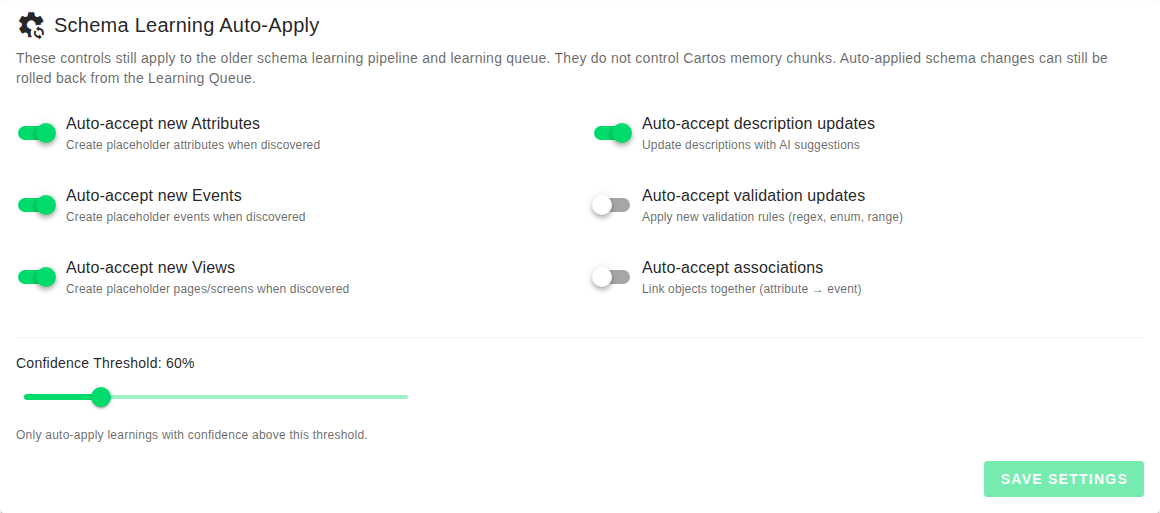
The current controls cover:
- Auto-accept new Attributes
- Auto-accept new Events
- Auto-accept new Views
- Auto-accept description updates
- Auto-accept validation updates
- Auto-accept associations
A practical way to think about these
- Attributes, Events, and Views are structural. Turning these on makes discovery faster, but it can create placeholders that still need cleanup.
- Description updates are lower risk for many teams and can be a good candidate for auto-apply.
- Validation updates and associations can have bigger downstream effects, so many teams should treat these more carefully.
If your schema is still early and moving quickly, a more permissive setup may help. If your schema is already mature and widely used, a more conservative setup is usually better.
Confidence threshold
The confidence threshold controls which learnings are allowed to auto-apply.
Only learnings above that threshold are automatically accepted.
What raising the threshold does
Raising the threshold means:
- fewer automatic changes
- more items left for manual review
- higher average confidence in the changes that do auto-apply
What lowering the threshold does
Lowering the threshold means:
- more automatic movement
- faster schema evolution
- more risk of accepting changes your team may want to review first
A good default mindset
If your team is still learning how the AI behaves, stay closer to the default and change one variable at a time.
If you loosen the threshold and turn on many auto-accept categories at once, it becomes harder to understand which setting caused a change in behavior.
Approving, rejecting, and rolling back learnings
The learning queue is where human review happens when a change is not auto-applied or when a team wants to revisit what the AI already did.
Approve
Use approval when the learning is correct and should be applied to the schema.
Reject
Use rejection when the learning is wrong, misleading, or not something your team wants represented in Anamap.
Roll back
Use rollback when a learning was applied but should be undone.
That makes rollback different from rejection:
- Reject says “do not apply this.”
- Roll back says “this was applied already, undo it.”
Operational advice
Review pending learnings regularly instead of letting the queue age indefinitely. A stale queue makes it harder to tell which learnings were useful and which ones were simply never reviewed.
Who should change these settings
The schema learning controls are owner-only for a reason.
These settings affect how quickly the data model changes, and the wrong configuration can create extra cleanup work for the whole company.
In practice:
- Owners should set the auto-apply strategy and confidence threshold.
- Admins and owners can still inspect operational Cartos behavior and, in some cases, manage outreach recipients and agent runs.
- The whole team benefits from providing clearer context so Cartos has less ambiguity to resolve.
Best practices
- Start conservative with validations and associations.
- Use auto-apply more freely for lower-risk categories if your team is moving fast.
- Review the pending queue on a regular cadence instead of in bursts.
- Treat onboarding context and durable memory as part of AI quality, not just metadata.
- If Cartos keeps missing context, improve the company profile and recipient coverage before trying to “fix” everything with a more complex threshold setup.
If you want to improve the quality of what Cartos produces across chat, email, and Slack, continue with Interacting with Cartos: Chat, Email, Slack, and Better Context.