Back To Integrations & Setup
Company Settings: Configure Cartos, Integrations, and Webhooks
Learning
03/24/2026
The Company Settings page is where you control how Cartos runs for your company and how Anamap connects to the systems around it.
If you only visit one operational page in Anamap, this is usually the right one.
Table of Contents
- What lives on the Company Settings page
- How to open Company Settings
- Cartos schedule and timezone
- Cartos release trigger token
- Google Analytics setup
- Amplitude setup
- Best practices
What lives on the Company Settings page
This page currently handles the most important company-level controls for Cartos and your analytics connections.
That includes:
- Cartos release trigger token management
- Cartos schedule interval selection
- Company timezone selection for scheduled runs
- Google Analytics setup
- Amplitude setup
Some of these settings affect how Cartos analyzes data. Others affect how it gets context into the system in the first place.
How to open Company Settings
- Select the company you want to work in from the company switcher.
- Open the Company Dashboard.
- Click the gear icon to open Company Settings.
If you are documenting an operating process for your team, this is the page to bookmark.
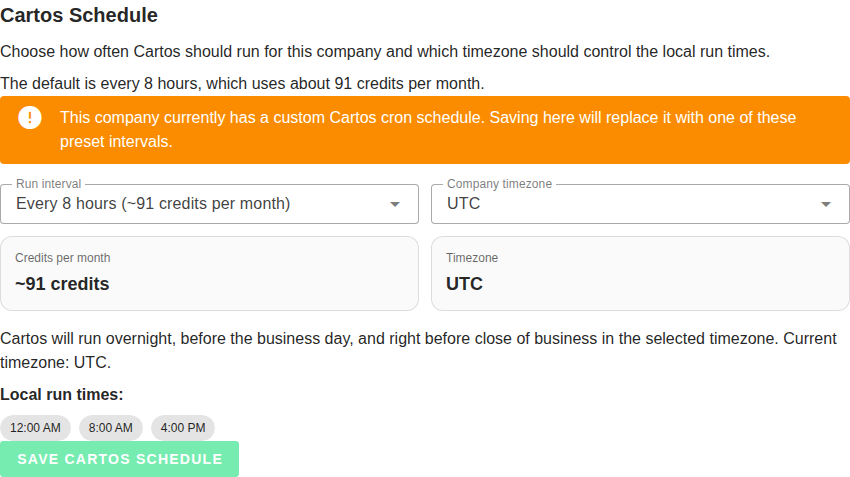
Cartos schedule and timezone
Cartos can run on a company-specific schedule so it checks for important changes without waiting for a person to open a dashboard or send a prompt.
What you can control
The schedule section lets you choose:
- A preset interval
- The company timezone used for local run timing
The current presets are:
| Interval | Approximate credits per month |
|---|---|
| Every 1 hour | ~730 |
| Every 2 hours | ~365 |
| Every 4 hours | ~182 |
| Every 8 hours | ~91 |
| Every 12 hours | ~61 |
| Daily | ~30 |
| Once a week | ~4 |
The default is Every 8 hours.
Why timezone matters
Cartos interprets the chosen schedule in the timezone saved for the company.
That matters because a good schedule is not just about frequency. It is also about when the runs happen locally.
For example, the every-8-hours preset is designed to hit three useful checkpoints in local time:
- 12:00 AM
- 8:00 AM
- 4:00 PM
That gives your team a fresh read before the workday starts, another check near the end of the business day, and one overnight pass.
What happens when autonomous mode is off
If your company has not enabled Cartos autonomous mode yet, Anamap still lets you save the schedule and timezone.
That means you can configure the operating rhythm first and turn on the broader autonomous workflow later.
When to choose each interval
- Choose Every 1 hour or Every 2 hours if your business changes quickly and the team wants aggressive monitoring.
- Choose Every 4 hours or Every 8 hours if you want a strong proactive cadence without burning through credits too quickly.
- Choose Daily if Cartos should behave more like a morning analyst check-in.
- Choose Once a week if you want periodic proactive review but most of your work is still reactive.
For a broader explanation of how Cartos behaves between runs and outreach, see How Cartos Operates: What to Expect as a Team.
Cartos release trigger token
The release trigger section is for CI/CD workflows that should notify Cartos when a release ships.
Use it when you want deployment events to create ownership and impact follow-up automatically.
What you manage here
On the settings page you can:
- Create or rotate the company-level webhook token
- Disable the token if you no longer want a company-specific token
- Confirm whether a token is currently configured
The Company Settings page shows the webhook endpoint and the primary auth header to use:
- Endpoint:
/api/public/cartos-release-trigger - Auth header:
x-cartos-release-trigger-token
If you want to wire this up from GitHub without building the request yourself, use the Cartos Release Trigger action on GitHub Marketplace.
If you want the fastest GitHub setup, prefer the reusable workflow at alex-schlee/anamap-release-trigger/.github/workflows/notify-anamap.yml@v1. It wraps the underlying action so callers only need to provide the company ID and trigger token.
Legacy aliases still work during the transition, but new setups should use the release trigger naming.
When to use a company token
Use a company-level token when:
- Different companies need separate webhook credentials
- You want easier token rotation at the company level
- You do not want to depend only on a shared environment-level fallback token
For payload examples, response codes, and implementation details, see Cartos Release Trigger: Setup & Requirements.
Google Analytics setup
The Google Analytics section is a guided GA4 setup flow.
What you need
You need:
- A GA4 Property ID
- Admin access on the property if you want to grant service-account access automatically
How setup works
The UI walks you through three steps:
- Enter your GA4 Property ID.
- Grant the Anamap service account access.
- Verify the connection and save the configuration.
You can either:
- Use the automatic access flow, or
- Copy the service-account email and add it manually in Google Analytics with Viewer access
Once connected, Cartos can query GA4 data for analysis and visualizations.
Good operational habit
After connecting GA4, test a simple question in Cartos right away. That confirms the connection works before your team relies on it for real investigation.
Amplitude setup
The Amplitude section lets you connect an Amplitude project to your company.
What you need
You need both:
- An Amplitude API Key
- An Amplitude Secret Key
These should come from the same project you want Cartos to analyze.
How setup works
The usual flow is:
- Open the correct Amplitude project.
- Copy the API Key and Secret Key.
- Paste them into Company Settings.
- Verify the connection.
- Save the configuration.
If the credentials are already stored, the page can show them as configured even if the integration is currently toggled off.
That separation is useful when you want to preserve credentials without actively using the integration.
Best practices
- Start with a timezone and schedule that match how your team actually works. A “technically correct” cadence is not useful if it lands at the wrong times for the business.
- Use the every-8-hours preset as a sane default unless you know you need more or less proactive coverage.
- Rotate the release webhook token when responsibilities change or if the token has been broadly shared.
- Verify GA4 and Amplitude connections immediately after setup by asking Cartos a small, real question.
- Revisit Company Settings whenever you change analytics tooling, support ownership, or CI/CD workflows.
If you are tuning how Cartos learns from conversations and schema discoveries, continue with AI Tuning: Memory, Learnings, and Approval Workflow.