Anamap Blog
Did checkout conversion drop or did GA4 tracking break?
Data Quality
Updated 2026-11-18
Start with the orders your store actually accepted. If GA4 reports fewer purchases after a checkout release, compare paid web orders with recorded purchases on both sides of the release. Then check how many people entered checkout. Steady sales can coexist with a falling conversion rate if more people tried to buy.
Put the two weeks on the same footing
Choose complete periods with the same weekdays and timezone. Allow the same time for purchases to arrive in each report. Write down which storefront, order statuses and payment methods you included. A Shopify total that includes point-of-sale orders answers a different question from a GA4 report filtered to web traffic.
For checkout completion, pick a unit you can follow. One definition is the share of people who started checkout in a given week and completed a purchase within 24 hours of their start. Give people who entered late on Sunday the full 24 hours. Dividing all purchase events by all checkout starts can count repeat attempts and people who started before the week began. We ran into the same denominator problem in our GA4 signup comparison.
What to check next
| What you see | What to check | What would change the diagnosis |
|---|---|---|
| Paid orders hold steady, but GA4 purchases fall. | Compare paid order IDs with GA4 transaction IDs for both weeks. Check when the gap widened and which checkout paths it affects. | A growing set of paid orders missing from GA4 points to lost measurement. If the gap is stable, check the rate denominator. |
| Paid orders and GA4 purchases both fall. | Split checkout starts and completions by device, channel and payment method. Follow the same starters through checkout in order. | If completion is stable within each segment, a shift toward a lower-converting segment can explain the overall decline. A new loss within one segment narrows the product investigation. |
| Orders look steady, but more people start checkout. | Check whether traffic grew or the release changed when checkout starts are recorded. Follow one checkout from entry to confirmation. | An extra start event can inflate an event-based denominator. More distinct starters with the same number of buyers can be a genuine fall in completion. |
Match paid orders to purchase events
Use the order identifier your checkout actually sends as transaction_id. Keep one row per paid web order, then match it to the corresponding GA4 ID. Count matched orders, orders missing from GA4 and GA4 IDs missing from the order export. Check repeated and empty IDs separately. Google documents how GA4 uses this field to deduplicate web purchases. GA4 transaction ID guidance
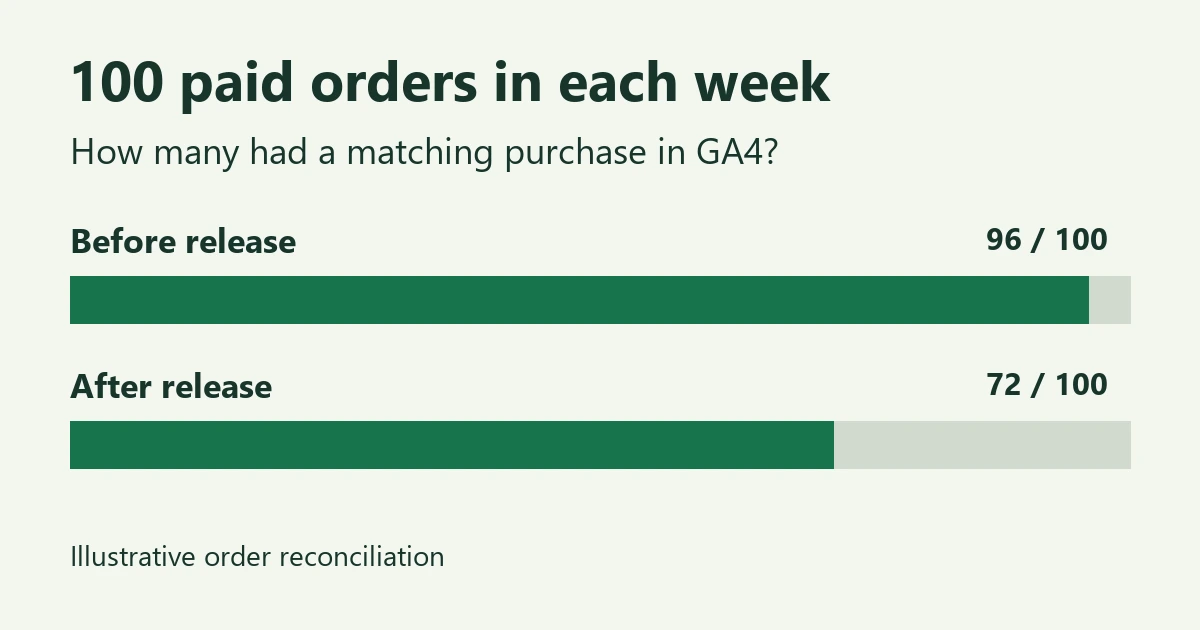
Suppose 96 of 100 paid orders matched in the week before a release and 72 of 100 matched afterward. In this illustrative example, paid orders held steady and 24 fewer orders matched. Pick a missing order and a matched order from the same day. If the missing orders cluster around an express payment method, test its return to the confirmation page. Check whether the purchase should come from the browser or your server, whether analytics consent was granted, and whether the event reached the intended GA4 stream.
A checkout release with a missing purchase event
In Anamap's illustrative checkout investigation, the channel mix looks similar across the release and the confirmation step changed. A browser check reaches that step without the expected purchase request. That gives the team a specific path to test. It still leaves open whether other buyers struggled to pay.
For a browser-tagged checkout, enable debug mode on a test device with analytics consent, complete a test order, and look for its purchase event and transaction ID in GA4 DebugView. For server-sent purchases, check the corresponding delivery record instead. Then repeat the order match for the affected payment method. If GA4 starts matching again but paid orders per checkout starter remain lower, keep investigating checkout friction. Google's purchase event diagnostics
Printable reconciliation checklist
- Record the release time, timezone, comparison dates and conversion window.
- Write down who enters the denominator and what counts as a completed purchase.
- Export paid web orders and GA4 transaction IDs for each period. Document exclusions.
- Record matched and missing IDs, then compare match rates before and after the release.
- Trace one affected checkout. Note its payment path, consent state and where the purchase event was expected.
- Write down which change the evidence explains, what remains open and what you'll check after a fix.
To try this in Cartos, choose a custom question during setup and add your dates to this one: "Did fewer people finish checkout after our release, or did GA4 record fewer purchases? Show the denominator and tell me which order records I need to check."